To delete your Goalunited account and personal data, login in and go to Home -> Personal data. Then select the tab "Manage account".
You will receive an email to the registered email address. For deletion requested in the game, this email contains a link to confirm the deletion. Removing the goalunited app from Facebook and requesting deletion of its data also starts the account-deletion process. In that case, the email contains instructions to create a new game password. You must set the password within 72 hours; otherwise, the account is permanently deleted. Accounts may also be deleted after a prolonged period of inactivity.
It will take up to 48 hours until the account is deleted if you don't have STARS or a premium account.
If you have STARS in your account, you will receive a voucher code with which you can transfer the stars to another account. However, to prevent intruders from being able to delete an account, we have added a waiting period. Accounts with premium accounts or Stars have a 7-day waiting period, and if you have just purchased GU-STARS within the last week, the waiting period is extended to 2 weeks.
Once the account is deleted, you will receive an email with a voucher code. If you decide to create a new account with the same E-Mail address, you can use the voucher code to receive credit for the remaining purchased GU STARS and premium account days.
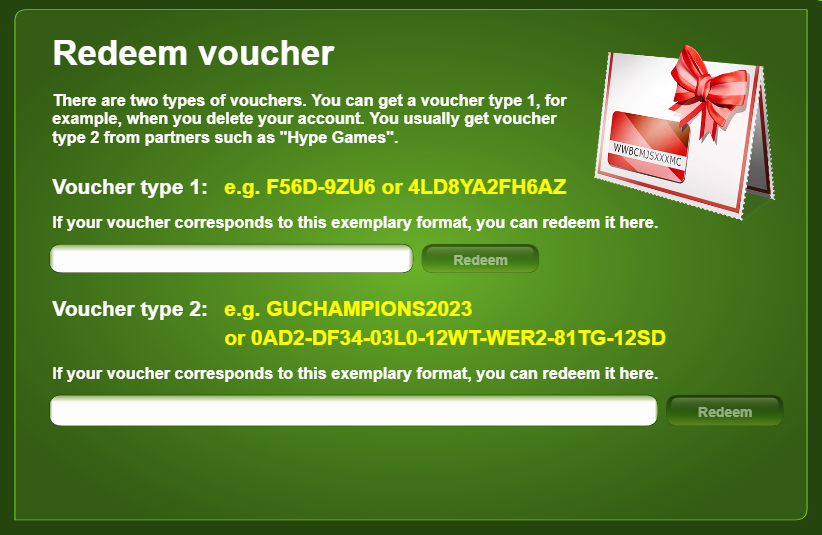
To redeem a voucher, click the Stars balance in your account, then ''Redeem voucher'' and enter the voucher in the appropriate field:

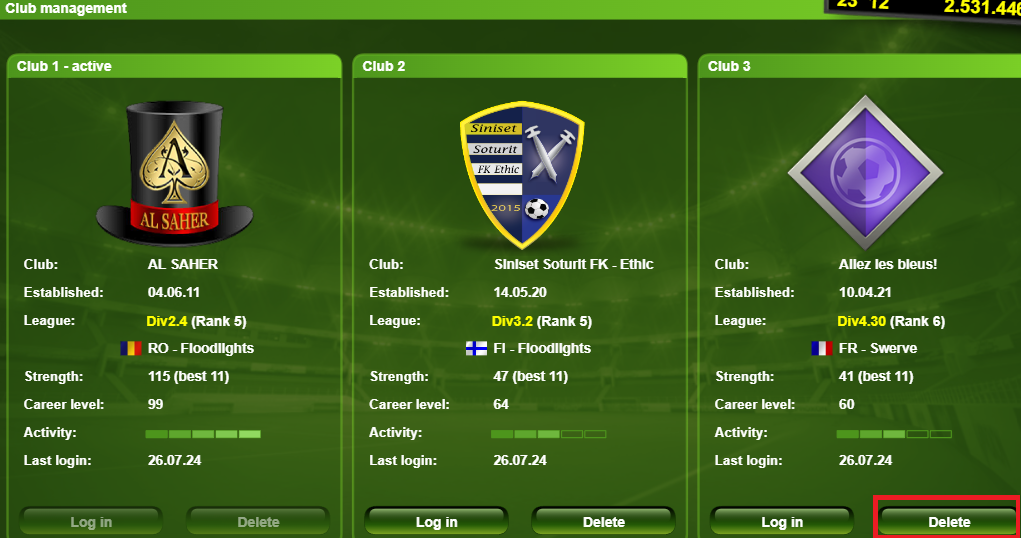
If you decide to delete just one of your clubs for any reason (whether you just started and chose the wrong league or maybe you want to start fresh in a different league after some time in the current league), go to Career -> Top Manager and click Delete for the club you want to start the deletion for:

In addition to manual deletion, which can be initiated by the account owner for an entire account or an individual club, accounts and clubs may also be deleted automatically after extended periods of inactivity.
If a club has been inactive in the last 6 weeks, it will not be moved to a league for the next season. Clubs with an active Premium account are always moved to the next season.
A few days after the new season starts, clubs that weren’t assigned to a league are permanently deleted.
A club is only kept for longer if its manager logged in within the 26 weeks before the start of the new season and if the club is strong enough (team strength above 18). If the manager logs in again within that time, the club rejoins a league with all its progress.
During a season, a club that hasn’t been played for 6 weeks and that doesn’t have an active Premium account can also lose its league place to a new manager. It is then deleted a few days later.
Clubs with an active Premium Account are protected from inactivity-based deletion. As long as the Premium Account remains active, the club will not be marked as inactive, and its progress will be preserved.
Please note that this protection does not apply if the club goes bankrupt. In that case, the club's progress will be permanently deleted even if a Premium Account is active.
To prevent your club from being deleted due to inactivity:
Keep a Premium Account active on the club.
Ensure the club generates sufficient regular income to cover its weekly expenses and avoid bankruptcy.